SAMR Ceiling?

Photo Credit: tim.klapdor via Compfight cc

Is Redefinition really the top of the Slope of Enlightenment? Photo Credit: tim.klapdor via Compfight cc

I have taught the concept of SAMR to teachers for years. We’re like old friends. But if I was honest I’d have to say SAMR and I have had a few fights and attempted to make up over the years. I think many educators are misunderstanding the stages of SAMR. One particular PD session I helped with years ago made this clear. We asked teachers to read educational scenarios and decide where they fit in the model. Some scenarios were simple to figure out but many of them were tough to slot into “S” “A” “M” or “R”. When we reviewed the “answers” teachers pushed back, giving great reasons why certain scenarios fit in various categories. “Do they just not understand?” I wondered, or was the model broken?

I’ve seen blog posts over the years that reinforce these wonderings. Excellent, well-meaning educators have blogged about SAMR, some even with examples of work that fits in the four different levels. But at times they seem to be saying conflicting things. Have a look at this article published in Edutopia where they tout shared Google Slides as “Redefinition” Wow. If that is Redefinition then I am left feeling like there is nowhere else to go. But have I, among many others that do things like share presentations online, really maxed out on the SAMR scale? Reid Wilson has a new take on this and I’ll have to say, I am in total agreement with his article and I could not have said better myself.

quote:
“At the redefinition tier, we are not really imagining and conceptualizing as much as we are applying what has already been thought of before.”

Wilson, I believe, is saying that the SAMR model limits us by steering us to think about the tools. The higher level, he calls it conceptualization, is another space above redefinition that allows for people to not just put the same old technology together in new innovative ways, but rather to think of things at a whole new level. We can conceptualize things. It’s beyond putting things together. It’s conceiving of ideas and it has a much higher ceiling than redefinition.

I chose the above image because its creator added this element that shows progress over time and I like this new dimension in the SAMR. Take a look at the line. Once we get into the “Redefinition” area we enter the “Slope of Enlightenment” but notice it is just a slope.

This diagram is begging for a new level but I am cautious about suggesting one. I almost want to leave the model behind and talk about this new “conceptualization” idea of Wilson’s, separate from the SAMR model. It leaves the troubles of the model behind and takes to to a new place where we can stop talking about tools and what we do with them and start talking about ideas and concepts.

Actually I like this concept of a revised Blooms’s taxonomy from Kathy Schrock of all the parts working together. There is no hierarchy, no top or bottom. All the processes work together like a machine.

My goal is to push my teachers to the next level or to an entirely new place if it is not a level. Will you join me in this healthy challenge of the SAMR model? Will you join me in liberating teachers from the idea that they must figure out new ways to “do technology” in order to climb to the top of the SAMR model?

————-

Disclaimer: Like Reid I don’t claim to be an expert on this subject and certainly not even close to Puentedura himself. I am just a heavy user with quite a bit of hands-on experience working with teachers and talking about this model.

————-

Side note: there are some very entertaining versions and modifications of the SAMR model out there, many inspired by iPad apps. Check this one out. May I make a general plea to the ed tech world? Please don’t create any more of these iPad app charts, wheels, diagrams, etc. It’s a bit like getting a tattoo on your arm of the number one song on iTunes. It’s going to be out of date by the time it’s done!

The Greatest New Feature in iOS 8 that Nobody is Talking About

Peer to Peer Airplay

There are a lot of great upgrades in iOS 8 but this one is my favorite. For years I have been saying that Apple should provide a way to do “ad hoc Airplay”  (like AirDrop) and now they finally have done it.

You can now connect to an Apple TV that is close to you, regardless of if you are on the same WiFi network.

This is huge for schools that use multiple SSIDs to segregate groups of users for security  reasons but have wrestled with the fact that AirPlay previously only worked when users were on the same subnet.

AirDrop, as many of you know, allows Mac/iOS users to wirelessly share files with people physically close to you. What you may not realize is that you can share a file with someone close to you that is not on your WiFi network. This is useful because many file-sharing protocols are limited to people on your WiFi network, but AirDrop uses another “channel”, above your plain old WiFi network, to share files. Now this works with AirPlay as well.

2 Things

1. I realize that some people used other methods to make AirPlay work across subnets before so you may not be too excited. For example I know that Xirrus Wireless systems have a settings that allows Airplay to work across subnets.

2. If you previously used separate SSIDs to segregate users and Apple TVs please don’t forget that is now “broken”. For example, your students can now select an Apple TV that you may have previously limited their access to by ensuring they were on another subnet.

Overall this is a great step for schools and for Apple. Good luck with things and please let me know how this new change works out for you!

For more information see the Apple TV website. (read the fine print at the bottom)

Twitter @davidwbeaty

Final Project – Zen Facelift for One of Our Digital Citizenship Bootcamp Presentations

This course reinforced for me the importance of visual literacy for our students as well as the importance of making visually appealing presentations. I thought for this final project I would transform a previously text-based presentation that was collectively designed by our faculty for the student One to One digital citizenship bootcamp in our high school. The presentation is used for a short meeting with HS kids where they are intended to learn about protecting themselves on the web. It’s got good content, which is a great place to start, but I thought it could use a facelift to really pack the punch we are looking for. Here’s the original version. The new version is after the break…

The new version confirmed several things I knew about creating “zen” presentations. It takes time, lots of time. The text and embedded videos in the first presentation took time to think about and create, but that is really just phase one of a “zen” presentation. Phase two is making it visually appealing. That can take as much or more time than the actual “writing” of the presentation. In this case it certainly did take more time.

What’s missing here is the real live presenter. It’s a funny thing about hosting a “presentation zen” presentation online. They don’t always make the best presentations for viewing later online. The best presentations really have to be that magical combination of the presenter and the media. If it helps please imagine a fun, charismatic presenter that makes you feel the material in your soul!

I also suggest you view this Google Presentation’s notes. It will help tremendously you to understand what the teachers will see and communicate when they present this. You can view the notes by clicking the little settings wheel, then choosing “Open Speaker Notes” or you can just view it in the editor to see the notes as well. I hope you like the “zen-ness” an are inspired to make your own amazing presentations!

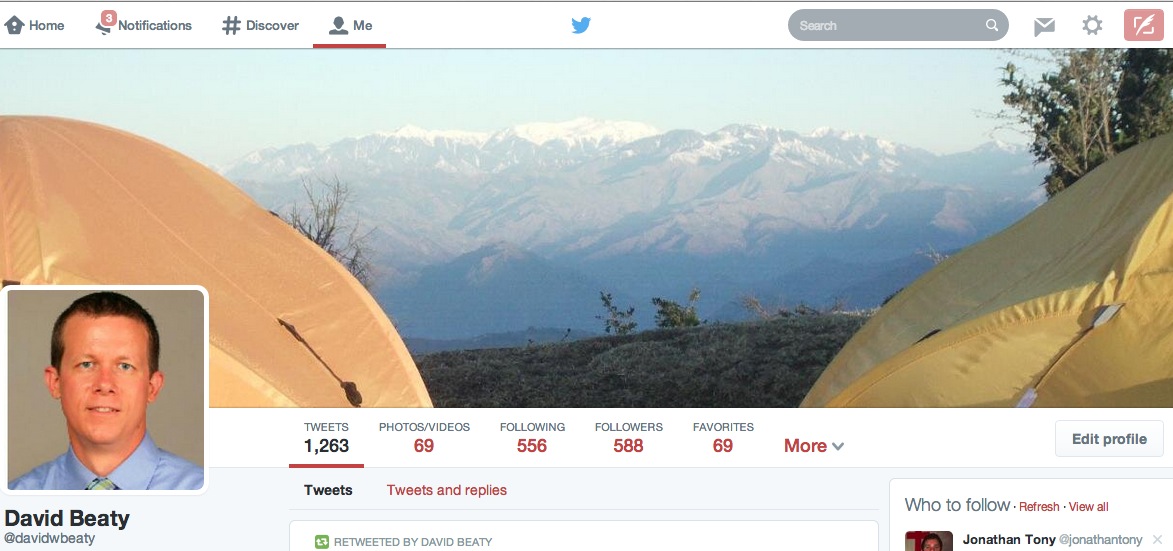
The new Twitter profile page

Image Credit: davidwbeaty on Twitter

Image Credit: davidwbeaty on Twitter


Have you seen the new Twitter profile layout? It looks to me like the people at Twitter have stepped things up in the visual department. They’ve moved up from the older, more text-based profiles to a “big broad image” style profile page. This is yet one more example of how we seem images competing where it was formerly only text. I mean, this is Twitter, a simple 140 character microblog, yet they have moved up to a big bold image layout! Twitter is not alone in this trend. In fact the whole web is going visual. Some estimates even show as high as 90% of web traffic as being video. Obviously video takes up more bandwidth than static images, but if we group images in with video, really most of the web is some form of media. This is why, again, it is so important that our students are visual literacy experts!


Finding the best tools – Infographic edition

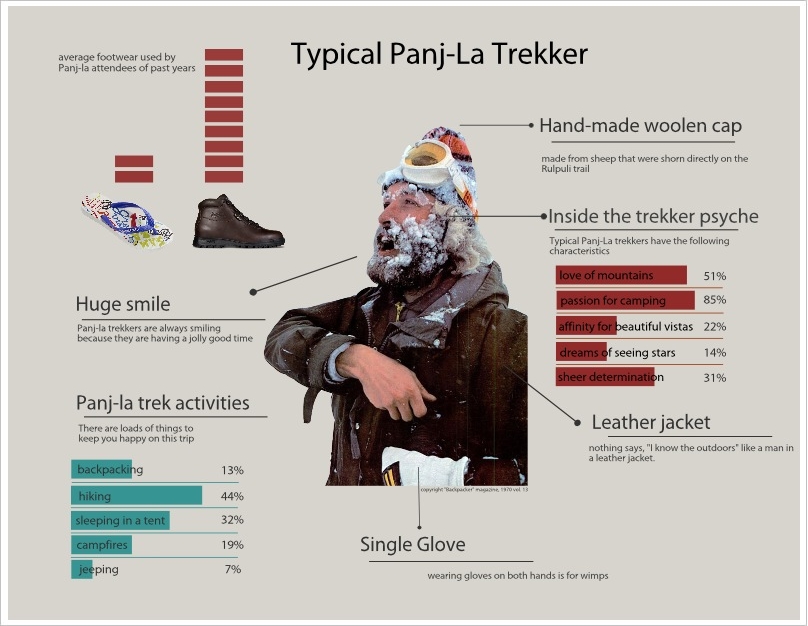
image source: David Beaty

image source: David Beaty

I was in charge of making a poster for our AES Minicourse trip last year. The first thing I did was to visit the minicourse office. The trip coordinator had told us that there were images in her office that we could use for making our posters. “Drop by” she said. And I did, bringing my USB flash drive with me. As it turned out, she had images, actual photos printed on paper and some blank posterboard and glue sticks. Yes, glue sticks. “No self-respecting tech person is going to make their poster with actual posterboard and glue stick” I thought to myself.

So I decided to make an infographic. A few tweets and Google searches later turned up a pretty substantial list of websites and tools, so I set to work. Jeff Utecht, in his video on making visually appealing presentations mentions that these more visually appealing presentations take more time than the old style boring presentations and I can confirm that. By the time I was done downloading, registering and testing the various infographic tools I was great to run back to that posterboard and gluestick. I even at one point tried the “build it from scratch in Photoshop” technique. But I stuck with it (no gluestick pun intended) and in the end I was pretty happy with the result.

I tried to keep it simple, incorporate humor and yet make it interesting enough to catch a high schooler’s attention among the many other posters. These posters, some 22 or more in all, are all hung up together in the high school breeezeway so there is significant competition among them. Yes, the idea is just to inform students about the trip, but there is no doubt they are meant to entertain as well.

In the end I used easel.ly. It was cheap, the tools worked well and the design options were what I was looking for. Save yourself the trouble and go straight there if you are looking to create an infographic.

Have a look at the result above and let me know what you think.

Dying for Better Presentations

It was a large ballroom. Men were in suits, women in business blazers. Big wine glasses filled with sparkling water. Smaller wine glasses filled with actual wine. Starched white table cloths. Fresh cut flowers on the table. It was a fantastic professional environment. The perfect setting to entertain, capture attention, bring the crowd to life. Except were were all dying. You guessed it: it was “Death by PowerPoint”. (I guess the flowers had a dual use)

And here’s the murder weapon. The actual presentation we sat through:

Names have been removed to protect the innocent. And please note this was a few years back and we have all gotten better now haven’t we? Honestly I hope so.

There’s something important to note about this experience: the speaker was actually very good. He had a good style of presenting and was funny when he needed to be. He actually did a fair job of using the following elements:

simplicity
unexpectedness
concreteness
credibility
emotions
stories

But the slide design was terrible. Honestly, scroll back up there and click through those slides again, all 54 of them. Do it. They are over-filled with text. The text does not flow or even match at times. There are bulleted lists, numbered lists, bulleted lists with boxes as bullets (nothing screams the 90s more than those box-style bullets) They are Franken-slides made from years of research.

As tempting as it is to re-make that slide show I cannot bring myself to do it, and I make plenty of presentations for other events so I thought I would add one of those here. It’s not perfect but is certainly a big step from the “Death by PowerPoint” you see above. This was a presentation that I collaborated on with some of our tech coordinators here at our school. We each did a part of the presentation. My slides are nothing but images. There are other slides that are images with a few bits of text. Other than the fact that is obviously mis-matched in its design (due to the fact that it was created by three people) I feel it’s a pretty good example of what a presentation can be. (may I suggest you use the settings icon to view the speaker notes, or you can hit the “s” key while moving through the presentation)

So you have an example of a good speaker with terrible slides and good slides with an average presenter (me). What’s the lesson here? You have to be able to design an eye-catching presentation. It really has to look great, right? But the real power is in the “performance” itself. I’ve seen crappy slides and a great presenter and it “worked”. People liked it, they learned, they walked away feeling good about the experience. But even the best slides in the world will fall flat if the speaker is not skilled. Look back at the list of elements of a great presentation above. Many of them are not directly about slides, though they can be applied in that way. They are mostly about the experience. So by all means please work on those slides. Focus on design. Kill the PowerPoint stereotype. But don’t leave the human presentation and style behind, it’s the real key to bring your presentation to life.

Vine is the new Kudzo

https://vine.co/v/Mz0dOYIEgJM/embed/simple?audio=1

(the above is a Vine from Tide that was used during the 2014 Superbowl as a competitor to traditional advertising)

If you have ever been to the southern United States you know what Kudzu is. Originally from Asia, the creeping choking weed has now made its mark on the US. Personally I feel like I am “home” when I see the huge sprawling vines covering the edges of the interstate each summer. It’s everywhere across the US, spreading like wild fire. Love it or hate it, kudzu is here to stay.

There’s another “plant” that seems to be spreading like kudzu: Vine. It’s the “new” (new-ish? middle aged? old?) short video sharing platform from Twitter. The concept is simple, you can record and share a short set of video frames that make a unique-looking video. 6 seconds, that’s all you get. Everyone wants in on the game. Instagram/Facebook, Whatsapp. They all have some kind of quick video option. So why is Vine on top right now? Why is the most emulated quick video? Why are advertisers jumping on this new form of media? Is it because it is different and trendy for now? Honestly I think only time will tell if it will really stay on top. Instagram has more users, but Vine still has the “shiny new cool thing” factor!

In its present state Vine looks a lot like YouTube. The popular videos are mostly people doing stupid things, saying ridiculous things, etc. Sure, there are the classy editor’s pics and the artsy “short film” genre Vines, but for some reason the highest view counts always go to the ridiculous clips. I’m not sure if that is more a statement on the tool as it is on our culture really. But Vine has a lot of potential. You can see that advertisers are already picking up on this new style of video. Lowes did a “Fix in Six” campaign last year which was the first of its kind. They challenged customers to create a 6-second Vine video of a way to fix something in their home. Look out for more and more of these kinds of ads that use cheaper, potentially “free” advertising methods.

I also see Vine’s influence on the rest of the web. It reminds me of the old days when animated gifs were new and popular. It’s funny, but the Vine movement for that reason makes me feel like I am taking a step back in time. So if animated GIFs faded away long ago, why are they making a comeback with Vine? Because it’s new and fun and trending, for this year. But will it stand the test of time, like the original vine, the old American kudzu?

I’d be interested in your opinion. Give a shout out via the comments below!

"kudzu" by Flickr user Kitten Wants

“kudzu” by Flickr user Kitten Wants